Quick summary: Headless commerce is a way to decouple the customer-facing front-end (your storefront, web app, PWA, mobile apps, In-Feed Shopping surfaces, and other touchpoints) from the backend commerce engine (catalog, pricing, inventory management, checkout, and order management). That separation is what makes Shoppable commerce—shopping embedded inside content like social media, video, editorial, and creator pages—easier to build, easier to iterate, and safer to scale without breaking core commerce functionality. Done well, it improves customer experience, load times, and experimentation velocity; done poorly, it creates fractured journeys, inconsistent pricing, and brittle integrations that quietly leak conversion rates.
Defining the two terms people constantly mix up
When teams say they’re “doing shoppable,” they often mean wildly different things: a TikTok Shop pilot, an Instagram social commerce gallery, a YouTube Shopping integration, or a creator landing page that behaves like a mini-storefront. In practice, Shoppable commerce is best understood as commerce embedded inside content—video, social, editorial, livestreams, influencer generated content, or curated collections—so the user moves from discovery → desire → purchase with minimal context switching. The reason it works is psychological as much as technical: the content provides social proof and intent, while the shopping layer removes friction at the exact moment confidence peaks.
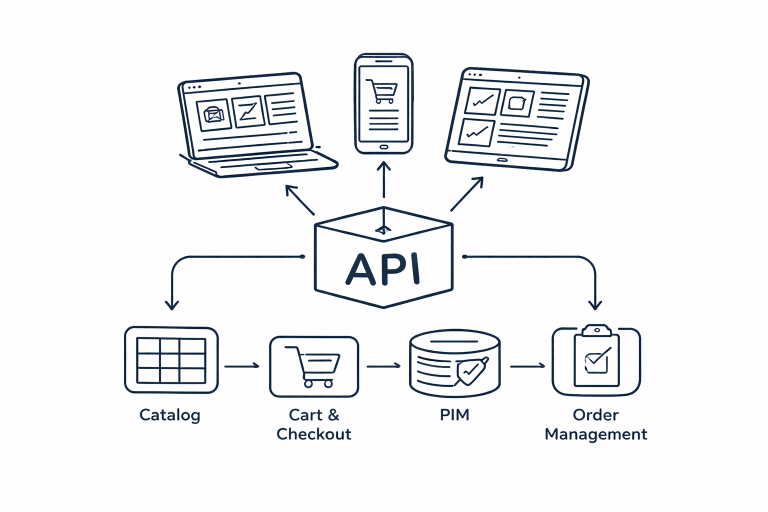
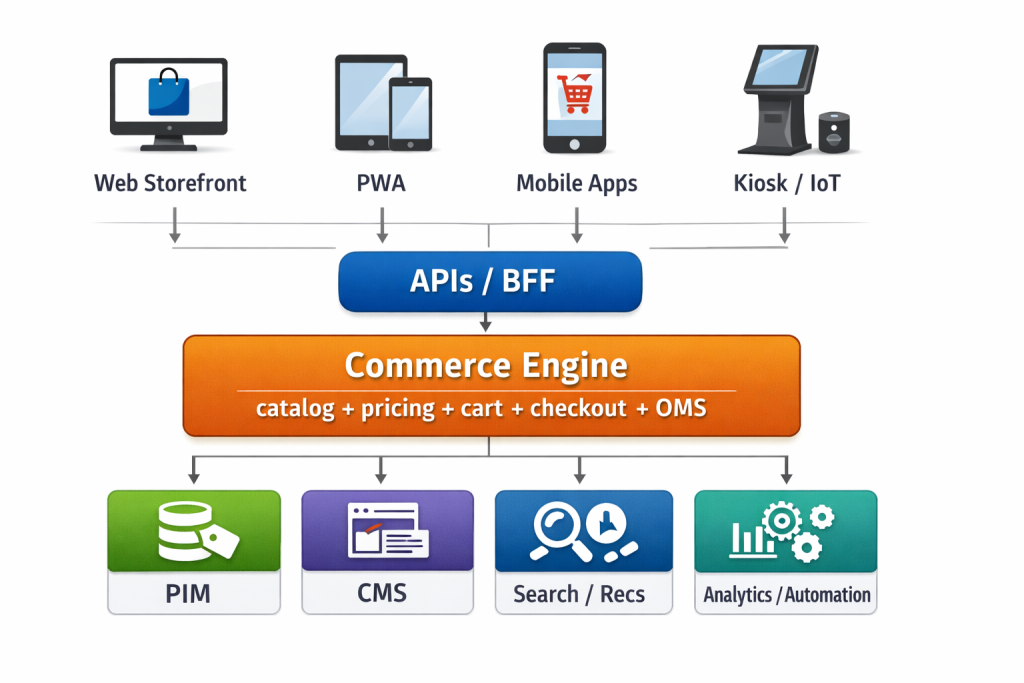
Headless ecommerce, by contrast, is an ecommerce architecture choice: the “head” (presentation layer / user interface) is separated from the commerce engine and connected through APIs—often application programming interfaces delivered via REST or GraphQL. That’s the whole idea: your front-end experience can change quickly (new templates, new UI modules, new content surfaces), while the back-end system stays consistent for business logic like pricing, promotions, taxes, inventory, and order management. Shopify’s Storefront API description is a clean example of what “API-driven checkout and commerce actions” looks like in the real world.
A simple mental model (and two quick diagrams)
Architecture (one commerce engine, many heads):
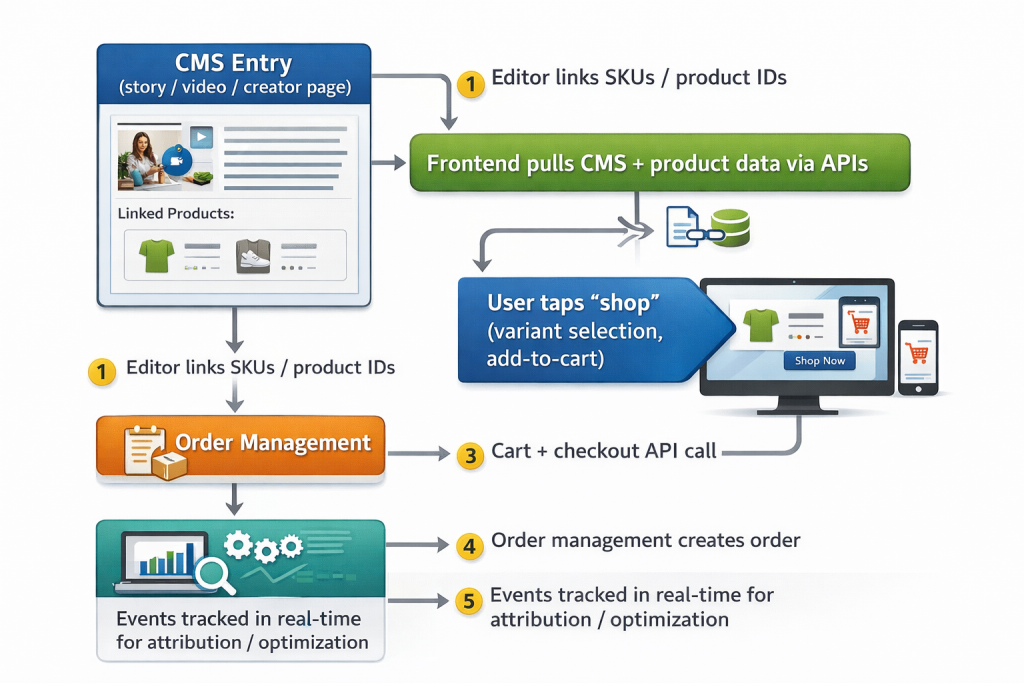
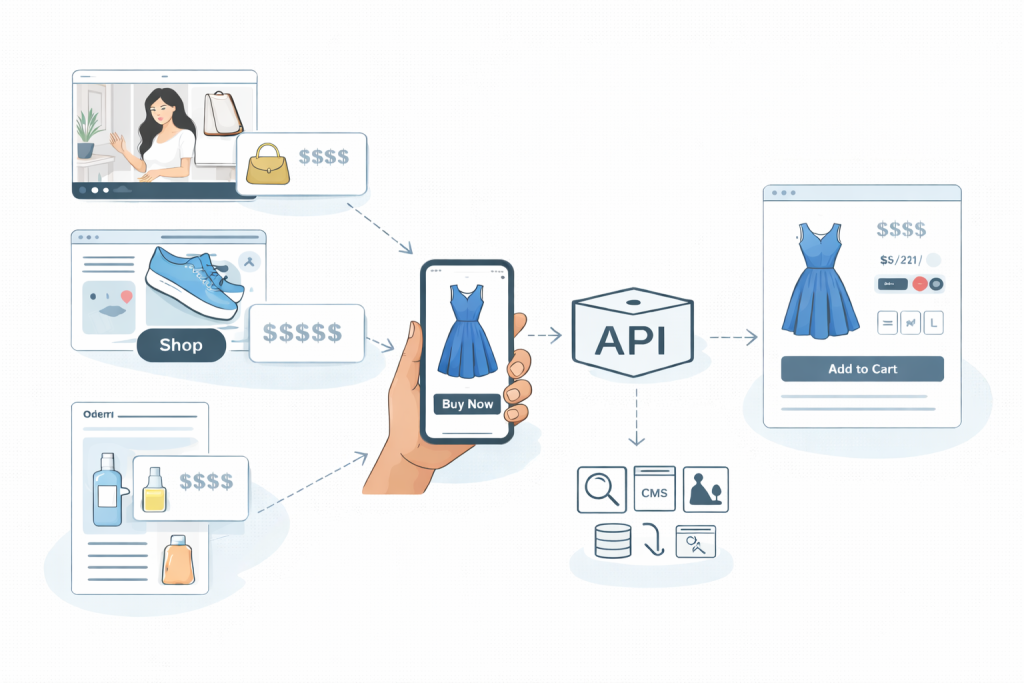
Shoppable data flow (content-to-cart):
A quick glossary, because teams lose weeks to ambiguity:
- Front-end / presentation layer: what customers see (React components, templates, UI modules).
- Backend / commerce engine: pricing, inventory, cart, checkout, order management.
- API-first: the platform is designed around APIs as the primary integration surface.
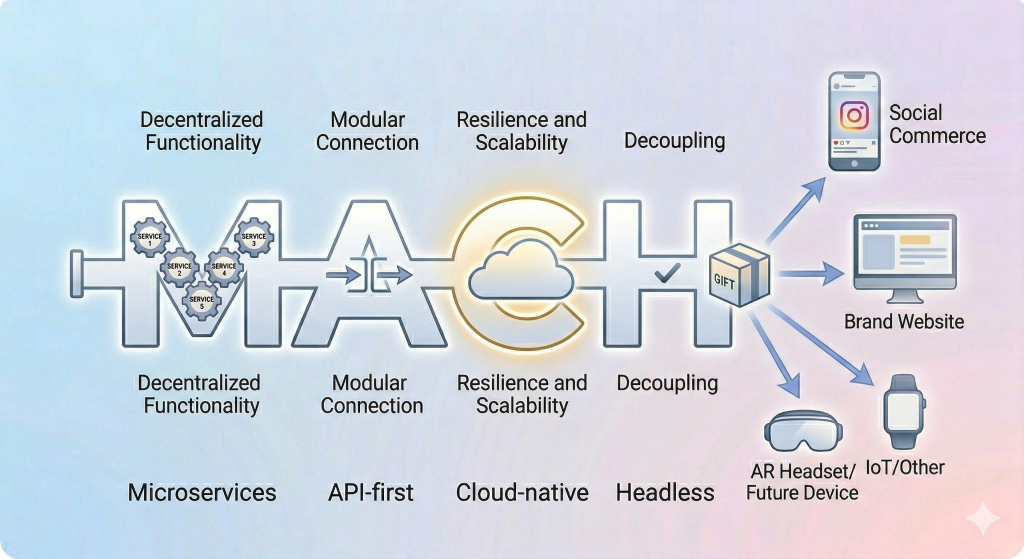
- Composable commerce / modular: you assemble best-of-breed providers (CMS, search, PIM, commerce cloud) rather than a single monolithic suite.
- MACH: Microservices, API-first, Cloud-native, Headless (a common framing for composable programs).
Why headless is a natural fit for Shoppable commerce
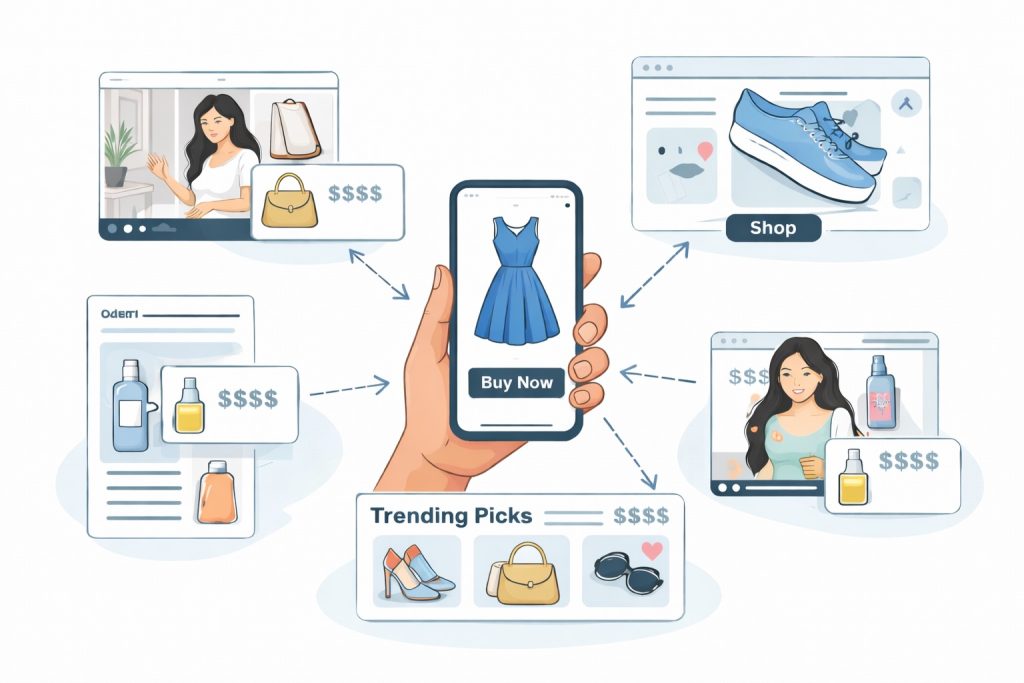
Shoppable experiences don’t behave like traditional ecommerce platforms where the PDP is the main selling surface and everything else is a supporting page. In Social shopping, the selling surface is wherever the customer’s attention already is—an embedded UGC marketing module on a PDP, a creator-led commerce collection page, a “shop the video” carousel, or a landing page built for Tiktok social commerce traffic. Those surfaces change constantly because culture changes constantly: formats shift, social media policies shift, creators shift, and the customer expectations for what “fast and native-feeling” means keep rising.
Headless commerce gives you that flexibility by letting frontend developers iterate on the customer-facing layer without forcing the business to replatform the commerce core every time a new channel becomes important. You can build a new experience layer for Tiktok Shop, Facebook Shops, Youtube Shopping, or an Instagram social commerce flow, while preserving the exact same pricing rules, promotion logic, inventory messaging, and checkout constraints. That consistency matters because the fastest way to lose trust is to show one price in content and a different price at checkout—or to show “in stock” in a shoppable instagram feeds module that turns into “sold out” one click later.
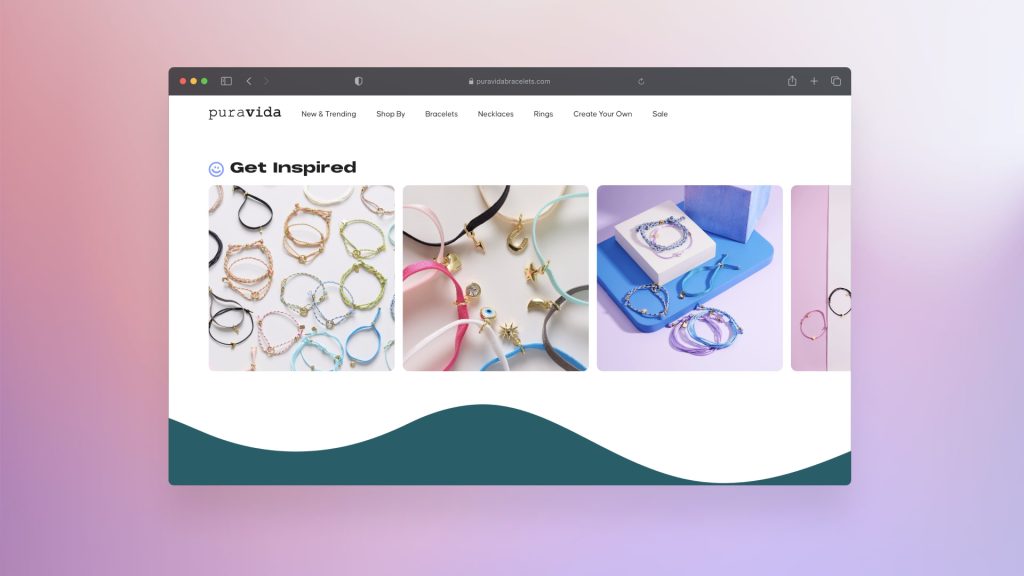
This is also where Foursixty sits in the ecosystem: as Shoppable Social for eCommerce becomes more infrastructure than campaign, the winners are the brands that treat UGC and creator content as conversion surfaces—not just top-of-funnel decoration. In the Pura Vida case study, for example, users who interacted with Foursixty’s shoppable photos clicked through to the point of sale at 18.2%, page views increased +73%, bounce rate dropped -34%, and 17% of online revenue was generated through Foursixty engagement.
Architecture patterns that actually hold up in production
Most headless commerce solution debates get stuck on buzzwords (“microservices!” “composable!” “API-driven commerce!”) instead of the real question: how do we keep commerce functionality correct while we move faster on the front-end experience? A durable headless commerce architecture usually looks like a small set of predictable building blocks.
You need a commerce engine (Shopify, BigCommerce, commercetools, or another ecommerce platform) to own catalog, pricing, promotions, cart, checkout, and order management. You need a content management system (CMS) to own editorial, video, creator content, and the content-to-product linking that powers Shoppable commerce modules. Then you need an experience layer—often a React or Next.js web app—that translates those raw capabilities into a customer-facing user experience optimized for conversion. Shopify’s Hydrogen is explicitly positioned as a React-based framework for headless storefronts, which is useful shorthand for the “experience layer” role.
The hidden work is the connective tissue: APIs, integration layers, caching rules, identity/session management, and analytics pipelines. This is where API-first platforms help because they reduce the amount of “creative hacking” required to build normal commerce flows on new surfaces. BigCommerce’s headless documentation is a solid example of how platforms frame these end-to-end headless pattern.
Two implementation models (and a decision table)
In practice, teams usually land in one of two models, and the “right” choice depends on who owns the customer experience in your org: content or commerce.
| Model | What drives the page | Best for | What breaks if you choose wrong |
| CMS-led shoppable | CMS is the source of truth; product modules are embedded into content | Brands with heavy storytelling, creator programs, editorial SEO, launch calendars | Commerce teams feel “blind” unless instrumentation is tight; risk of inconsistent merchandising rules |
| Commerce-led shoppable | Commerce platform drives placements; content is attached to products/collections | Retailers with strong merchandising ops, frequent promos, structured taxonomy | Content velocity suffers; shoppable surfaces can feel repetitive and less native to social traffic |
A healthy compromise is to let the CMS own narrative structure and let the commerce engine own transactional truth (pricing, promos, inventory, checkout). That’s composable commerce in real terms: modular responsibilities that can scale without turning into a monolithic bottleneck.
UX patterns for Shoppable Social that lift conversion without feeling gimmicky

Shoppable commerce fails when it tries to force buying behavior instead of supporting buying confidence. The winning patterns feel like helpful context, not aggressive upsells. “Shop the look” bundles work because they reduce decision fatigue; inline product cards work because they keep relevance tight; creator storefronts work because they transfer trust from a person to a product without pretending that trust is universal.
The best implementations also respect the moment of intent. A user arriving from social media often wants quick verification—“Is this real? Will it fit? Will it arrive? Can I return it?”—before they want a full product deep-dive. If your shoppable module can answer those questions with clear variant selection, accurate pricing, delivery estimates, and easy returns links, it earns the click into checkout. If it can’t, it creates a high-friction detour that customers interpret as risk.
The business case: what “benefits of headless commerce” really means in metrics
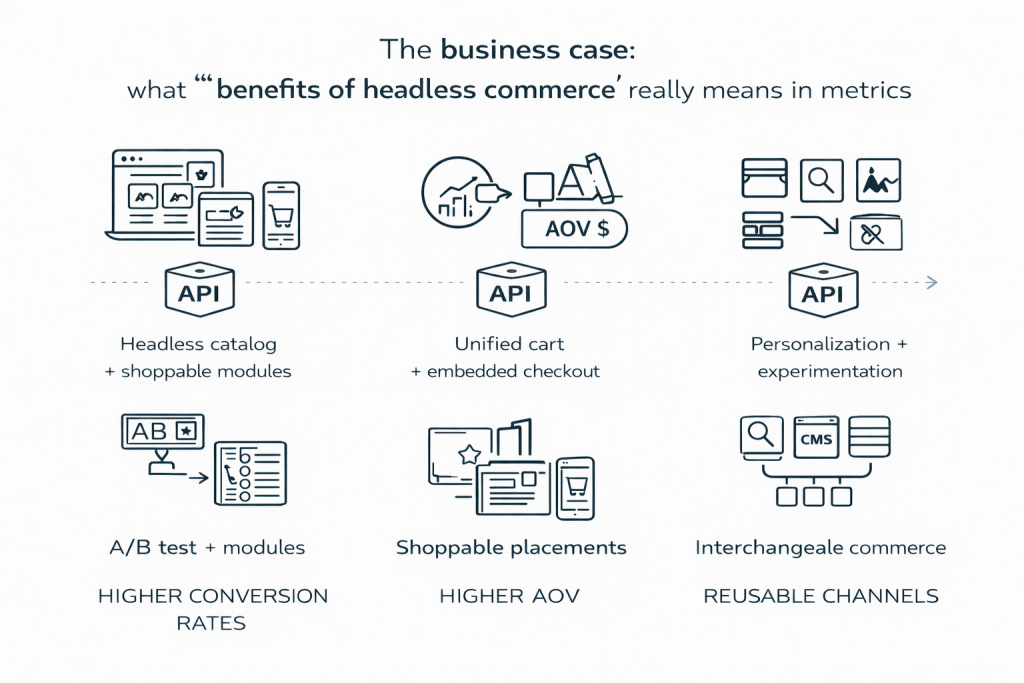
Headless commerce is often sold on scalability and “faster time to market,” but those benefits only matter if they translate into outcomes: higher conversion rates, higher AOV, and more reusable customer touchpoints across an omnichannel roadmap. When the presentation layer is decoupled, you can run A/B tests on UI modules, refine shoppable placements, and personalize experiences without waiting for back-end releases. When it’s composable, you can swap providers—search, CMS, PIM, experimentation—without replatforming the entire ecommerce architecture.
The tradeoff is governance. A modular tech stack creates more degrees of freedom, which is great for optimization, but it also creates more ways to drift into inconsistency (pricing mismatches, stale inventory messaging, fragmented analytics). That’s why serious API-driven commerce programs invest early in shared schemas, stable product identifiers, and event pipelines that unify attribution across surfaces.

MICHI is a useful shorthand example of why execution matters more than ideology: they implemented an advanced shoppable integration quickly and reported 51x ROI in the first 30 days, which is less about a magical widget and more about reducing friction between content engagement and transactional completion.
Implementation, phased: how to ship without blowing up checkout
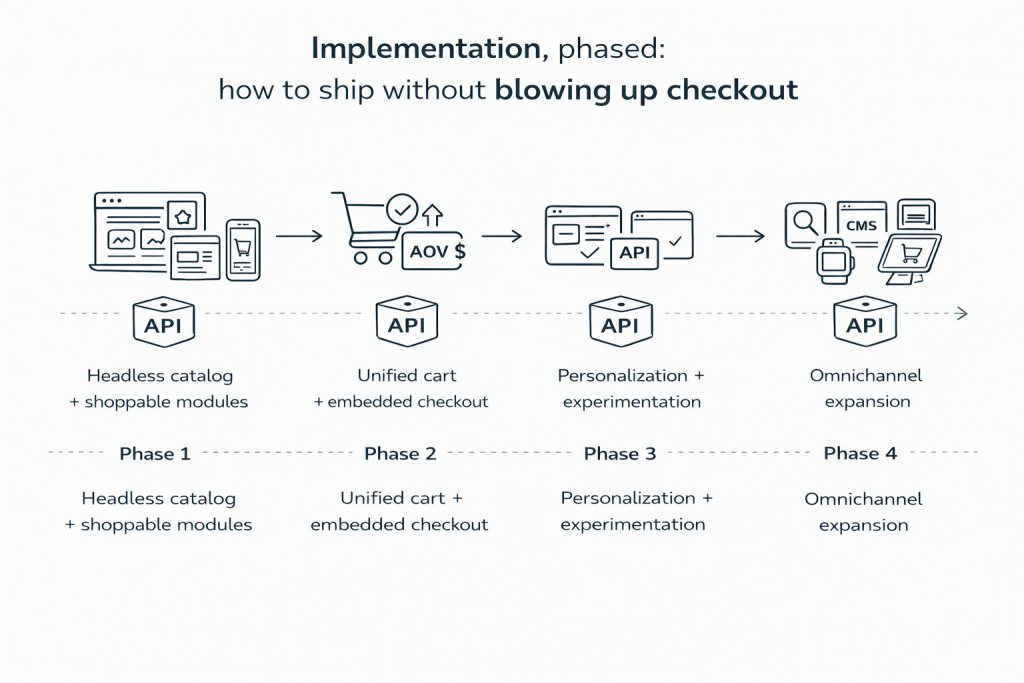
Most failures come from trying to go “full headless” in one leap—front-end rewrite, new CMS, new data model, and new checkout flow all at once. A safer pattern is a phased approach where you earn speed without gambling trust.
Phase 1: Headless catalog + shoppable modules. Start read-only: pull product data via APIs, render shoppable modules on key pages, and route add-to-cart into your existing cart where possible. This is where “shopify apps to increase sales” and shoppable galleries often fit nicely: they improve front-end experience without requiring a deep replatforming.
Phase 2: Unified cart + embedded checkout. Once engagement proves out, unify cart logic so your customer-facing experiences behave consistently across touch-points. Shopify’s Storefront API explicitly supports carts and checkout flows for headless builds, which is why it often anchors Shopify headless programs.
Phase 3: Personalization + experimentation. Introduce feature flags, personalization, and automation only after your baseline journey is stable and measurable. This is where composable commerce earns its keep: swap in best-fit providers for search, recommendations, and testing without rewriting the whole storefront.
Phase 4: Omnichannel expansion. Once the core works, expand to new “heads”: Pwa, mobile apps, in-store, kiosks, even IoT surfaces where it makes sense. The point isn’t novelty—it’s consistent commerce logic everywhere customers expect it.
Integration details that separate “works in staging” from “works in the market”
The practical details that matter are boring—and that’s exactly why they decide outcomes. You need stable identifiers (SKU vs product ID) so content modules don’t silently detach from products when catalogs change. You need variant handling inside the shoppable component (size/color) so you don’t shove complexity into checkout. You need cache rules and invalidation so pricing stays accurate and inventory messaging is honest, especially when real-time isn’t feasible and you’re running near-real-time updates.
Performance is part of trust, not just engineering pride. Google frames Core Web Vitals as measures of real-world user experience—loading, interactivity, and visual stability—and recommends achieving “good” CWV for search success and UX quality. If your headless storefront is “beautiful” but your load times are slow, your shoppable modules are effectively adding friction at the exact moment you’re trying to remove it.
Security, privacy, and trust: the part teams underfund until it’s painful
Shoppable commerce is conversion-heavy, which makes it attractive—but it also raises the stakes for privacy, consent, and payment security. Your headless approach should treat checkout boundaries as sacred: keep PCI scope tight by using tokenization and approved payment flows, and avoid casually expanding the set of systems that store, process, or transmit card data. PCI SSC’s guidance on securing ecommerce is a good baseline reminder that compliance and secure design are operational disciplines, not a checkbox.
Trust is also UX. Put delivery estimates, return policies, and customer support visibility directly in the shoppable flow—especially for social traffic where skepticism is rational. If you use creator monetization, be transparent with disclosures; if you track behavior across touchpoints, implement consent management cleanly. When brands ignore these details, the failure mode is rarely “a big dramatic breach” on day one—it’s gradual conversion decay as customers sense risk.
SEO and discoverability in a headless world
Headless can be excellent for SEO, but only if you choose the right rendering strategy and avoid thin, duplicated pages. SSR/SSG/ISR patterns exist because search engines and humans both reward fast, stable pages that deliver value immediately. For shoppable content hubs, the trap is generating thousands of near-identical pages that exist only to host a module—Google will treat that as low value, and users will bounce because the page doesn’t answer their intent.
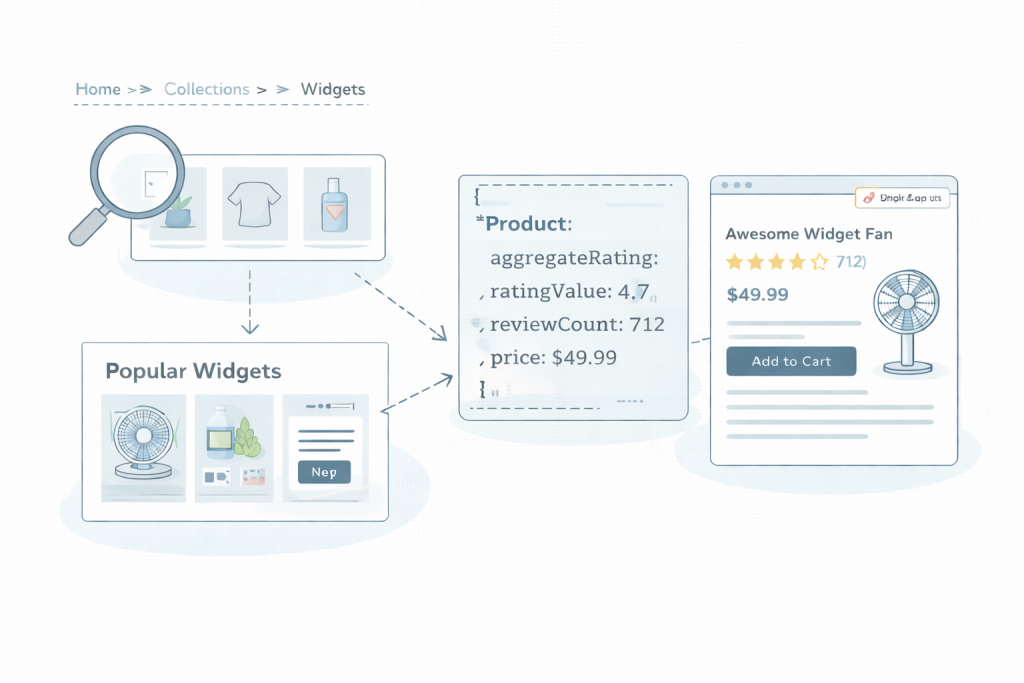
Structured data helps when it’s truthful and complete. Schema.org’s Product type and aggregate ratings are foundational references (and Google’s structured data guidance clarifies what’s required for review snippets). Internal linking matters too: content → collections → PDPs, with consistent canonicals and clear UX pathways so search discovery turns into purchase paths instead of dead ends.
Platform and tooling considerations (balanced, no “one true stack”)
Your stack should match your org’s skills, not your org chart’s ambitions. Shopify Plus can support headless storefronts through Hydrogen/Oxygen and the Storefront API, which is why many teams treat Shopify as viable for headless when they want speed plus a strong ecosystem. BigCommerce positions itself as API-first and headless-friendly as well, and its headless docs are straightforward for teams mapping flows.
At the enterprise composable end, commercetools emphasizes API-first commerce and MACH-style modularity as a way to connect the broader ecosystem (CMS, PIM, search, and more). The point isn’t which logo you pick—it’s whether your development teams can operate the system: feature flags, CI/CD, monitoring, and the operational maturity to manage multiple providers without turning “modular” into “messy.”
Real-world patterns from Foursixty-style outcomes
The most instructive thread across the Pura Vida and Frankies outcomes is not “UGC is good” (everyone already believes that). It’s that shoppable placement changes the economics of content by making it measurable and repeatable. Pura Vida used shoppable galleries across homepage, product pages, email, and the Shop app—multiple customer touchpoints—then saw measurable shifts in engagement quality: higher page views, lower bounce, and meaningful revenue attribution tied to shoppable interactions.

Frankies demonstrates the compounding effect of treating Social shopping as infrastructure: keep the galleries running, put them where decisions happen, and let the content do the persuasion while the commerce layer does the closing. The lesson for headless teams is practical: you want a storefront architecture that makes these placements easy to add, test, and refine—without rewriting checkout every time the creative strategy evolves.
Conclusion and next steps
Headless is worth it when shoppable experiences are not a side quest but a core growth loop—when content, creators, and omnichannel touchpoints are where demand is created, and your job is to turn that demand into checkout completion without trust leaks. It’s also worth it when your organization needs faster iteration on front-end experience than a monolithic platform release cycle can support. But if your team can’t reliably maintain APIs, observability, and governance across providers, headless can turn into expensive complexity that makes optimization harder, not easier.
If you’re starting, pilot one shoppable format (e.g., shoppable instagram feeds or a creator collection page) on one channel, and measure CTR → add-to-cart → checkout completion with clean attribution. If you’re migrating, decouple in phases: stabilize the back-end system first, then expand heads as you prove reliability and ROI.
FAQs
What does headless commerce mean?
Headless commerce means your storefront (front-end / presentation layer) is separated from the commerce backend, and they communicate through APIs. That separation lets you build multiple customer-facing experiences—web, PWA, mobile apps, kiosks—on top of the same catalog, pricing, and checkout logic. The benefit is flexibility and faster iteration; the risk is governance drift if teams don’t keep data, tracking, and merchandising rules consistent.
Is Shopify headless commerce?
Shopify can absolutely be used as a headless commerce platform, because it provides APIs (including a Storefront API) that support product browsing, carts, and checkout flows. Shopify also offers Hydrogen (React) and Oxygen as a recommended approach for building headless storefronts, which is a strong signal that headless is a first-class pattern in its ecosystem. Whether Shopify is the right headless commerce solution depends on your required customization, scale, and how your team wants to manage the tech stack.
What does “headless” mean in business?
In business terms, “headless” means separating the customer-facing layer from the operational system of record so each can evolve independently. That’s valuable when your customer experience must change quickly—new channels, new UI patterns, new content formats—while your core business logic must remain stable. It’s essentially an operating model for speed: decouple the parts that need rapid iteration from the parts that must be correct and compliant.
How is headless commerce different from traditional commerce?
Traditional ecommerce platforms are often more monolithic: storefront, CMS-like content features, and commerce logic are tightly coupled in one system. Headless commerce decouples those layers, letting you build custom user experiences without being constrained by the platform’s default templates. The tradeoff is that you take on more integration work—APIs, caching, analytics, and QA—so the customer journey doesn’t fracture across touchpoints.
What is headless commerce architecture?
Headless commerce architecture is the set of components and integration patterns that connect the experience layer (frontend) to the commerce engine (backend) through APIs. A common setup includes a commerce platform, a CMS, a front-end framework like React, optional PIM, search/recommendations, and an analytics/event pipeline. The goal is to keep pricing, inventory, and checkout consistent while allowing the storefront and shoppable modules to iterate quickly across omnichannel surfaces.
What Is a Headless eCommerce Platform?
A headless ecommerce platform is a commerce engine designed to expose core commerce functionality through APIs so you can build any storefront experience you want on top of it. Instead of forcing you into a specific templating system, it supports custom storefronts, mobile apps, and specialized shoppable experiences through API access. Shopify’s Storefront API and BigCommerce’s headless documentation are examples of how platforms describe this capability.
Who Can Benefit from Headless Commerce Platforms?
Brands benefit most when they have multiple touchpoints to serve—content hubs, creator programs, multiple regions, multiple apps—or when they need to move faster than a monolithic release cycle allows. Teams investing in Social shopping, Shoppable Social, and creator-led commerce often benefit because shoppable placements and formats evolve quickly. Conversely, small teams with simple catalogs and limited development capacity may not see enough upside to justify the complexity.
What skills or team roles are required to maintain a headless commerce architecture?
You typically need strong frontend developers (often React/Next.js), backend or platform engineers who understand APIs and authentication, and someone who owns data/analytics instrumentation end-to-end. You also need QA discipline for checkout flows, plus DevOps or platform capability for monitoring, performance, and deployment automation. If those roles are missing, the system tends to break in subtle ways: pricing mismatches, analytics gaps, and unstable cart/checkout behavior under load.
Does every eCommerce store need a headless solution?
No—headless is a strategic choice, not a default best practice. If your storefront needs are satisfied by templates, your experimentation cadence is low, and your team doesn’t want to manage multi-system complexity, a traditional approach can outperform simply by being simpler and more reliable. Headless earns its keep when speed of iteration, omnichannel surfaces, and differentiated UX are core to growth.
What does Google Cloud offer to modernize digital commerce?
Google Cloud offers retail-focused tools around search, recommendations, and personalization that can plug into a composable or headless ecosystem—often as providers you integrate into your experience layer. For example, Vertex AI Search for commerce is positioned around AI-powered search and recommendations at scale.
What are the advantages of using headless commerce for online retailers?
The big advantages are flexibility in the user interface, faster iteration on the front-end experience, and the ability to reuse the same commerce logic across multiple heads (web, PWA, apps, kiosks). It can improve customer experience by tailoring flows to channel intent—especially for social media traffic—without compromising checkout correctness. The downside is higher integration and operational burden: more moving parts, more vendors, and more places to introduce inconsistency.
How can headless commerce improve website performance and user experience?
Headless can improve performance because you can optimize the presentation layer for speed—modern frameworks, smarter caching, better asset delivery, and fewer template constraints. That matters because performance is a user experience and trust factor, and Google’s Core Web Vitals explicitly measure real-world UX quality around loading, interactivity, and stability. If you implement headless without performance discipline, though, you can end up slower than a well-tuned traditional build.
What are the advantages and disadvantages of adopting a headless commerce strategy?
Advantages: faster time to market for UX changes, better omnichannel reuse, stronger experimentation velocity, and more control over shoppable surfaces and personalization. Disadvantages: higher engineering complexity, more integration work, greater vendor coordination, and more responsibility for security/privacy boundaries. In short, headless increases your degrees of freedom—so you need the governance maturity to use that freedom without creating chaos.
How does headless commerce improve customer experience?
It improves customer experience when it lets you tailor storefront flows to the customer’s context: social traffic gets fast validation and shoppable modules; search traffic gets content depth and structured navigation; returning customers get personalized experiences. It also helps when it keeps commerce functionality consistent across touchpoints—same pricing rules, same inventory truth, same checkout reliability—so customers don’t encounter “surprises” that feel like risk. But if the experience layer and back-end system fall out of sync, the customer experience degrades quickly because inconsistency reads as untrustworthy.